App for iPhone
TapeScout
A field recorder for iPhone: collect, organise and cut sounds – with pre-roll, shelf and editor, and pass them on as a cassette to QuadGrain on iPad.
- Device
- iPhone with iOS 17 or later, Apple Watch as remote (watchOS 10+)
- Inputs
- Built-in microphones (stereo), USB microphones and interfaces, AirPods for speech
- Languages
- English and German
- Status
- Coming soon.
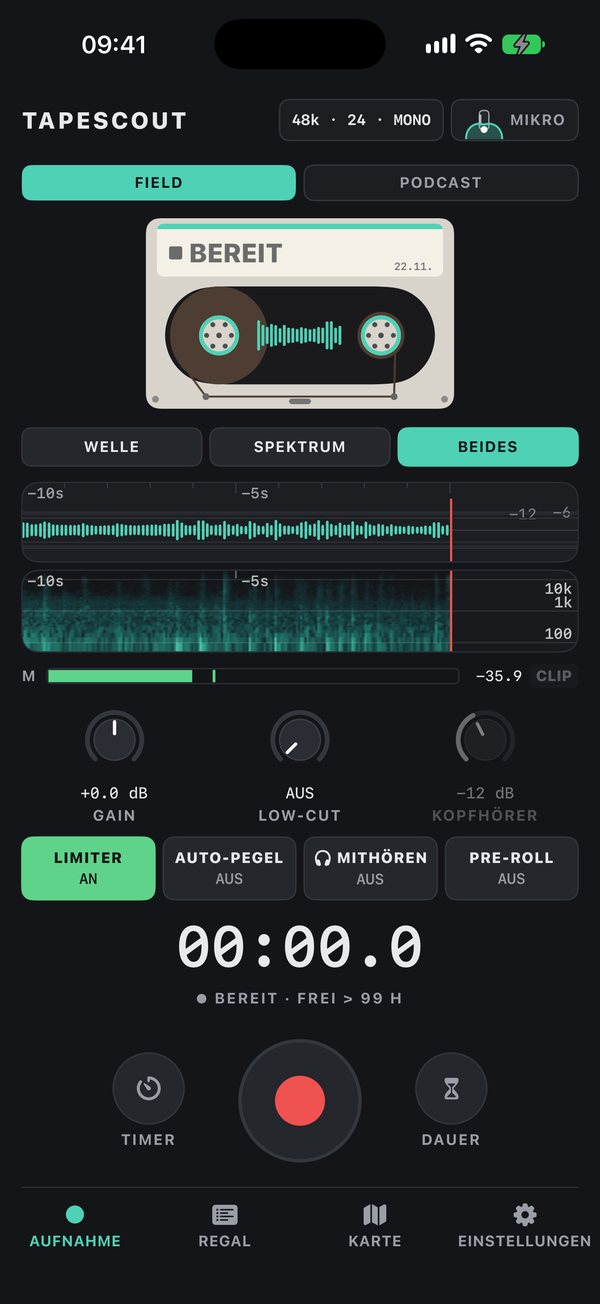
A look inside
What TapeScout looks like


Support
Help and contact
Write to support@neumenne.com – ideally with your iPhone model, the iOS version and the text from Settings → DIAGNOSTICS → SHARE. The text contains only technical audio details (microphone, format, levels), no recordings.
How do I choose the microphone?
On the recording screen, tap the microphone field at the top right. There you choose the position (back, front, bottom) and polar pattern of the built-in microphones. A connected USB microphone or interface appears under INPUT and is used automatically; set level and phantom power on the device. AirPods can be selected as a speech microphone (for interviews, not for ambience).
Why does TapeScout record only mono?
Stereo is available with the built-in microphones at the back and front positions. Tap the format field at the top and choose STEREO. If TapeScout reports that no route delivers stereo, the stereo test under Settings → DIAGNOSTICS helps – it tries all options and tells you what your iPhone offers. External microphones deliver stereo only if they have two channels.
Where are my recordings? What about iCloud?
Recordings are on the shelf in the app and in the Files app under “On My iPhone › TapeScout”. Exported files are in the “Export” folder there. The cloud at the top of the shelf shows TapeScout's iCloud folder; “BACK UP ALL RECORDINGS NOW” puts copies into iCloud Drive › TapeScout. If nothing appears there: check iCloud Drive in the iOS settings and tap “ICLOUD: WRITE TEST FILE” under Settings → DIAGNOSTICS.
How do I get a recording into QuadGrain?
On the shelf tap SELECT, tap recordings, then CASSETTE (Pro). Send the cassette to QuadGrain on iPad via AirDrop, the Files app or iCloud. A slot in QuadGrain holds 60 seconds; TapeScout shortens longer recordings on request or shares them as WAV. Open cassettes from QuadGrain in TapeScout with IMPORT or “Open with”.
Monitoring is loud or quiet – and what about hearing protection?
MONITORING puts the input on your headphones; HEADPHONES only sets the volume in your ear, not the recording. A fixed safety limiter keeps the headphones below −3 dB, and monitoring starts quietly and fades in. We also recommend the iOS setting “Reduce Loud Audio” (Settings → Sounds & Haptics → Headphone Safety). Without headphones monitoring stays silent, otherwise there would be feedback.
What does TapeScout cost? Is there a subscription?
TapeScout is free. Recording, editing and export as WAV in recording quality stay free. TapeScout Pro is a one-time purchase without a subscription (more formats and conversion, batch export, cassettes, batch rename, LUFS normalization, noise reduction; LUFS measurement stays free). On a new device: Settings → PRO → RESTORE PURCHASES.
The Apple Watch does not start the recording.
To start, TapeScout must be open on the iPhone – iOS does not allow starting the microphone from the background. Stop, marker and pause also work with the iPhone locked.
Privacy
The app collects no data
No accounts, no analytics, no ads. The details are in the privacy policy of the app.